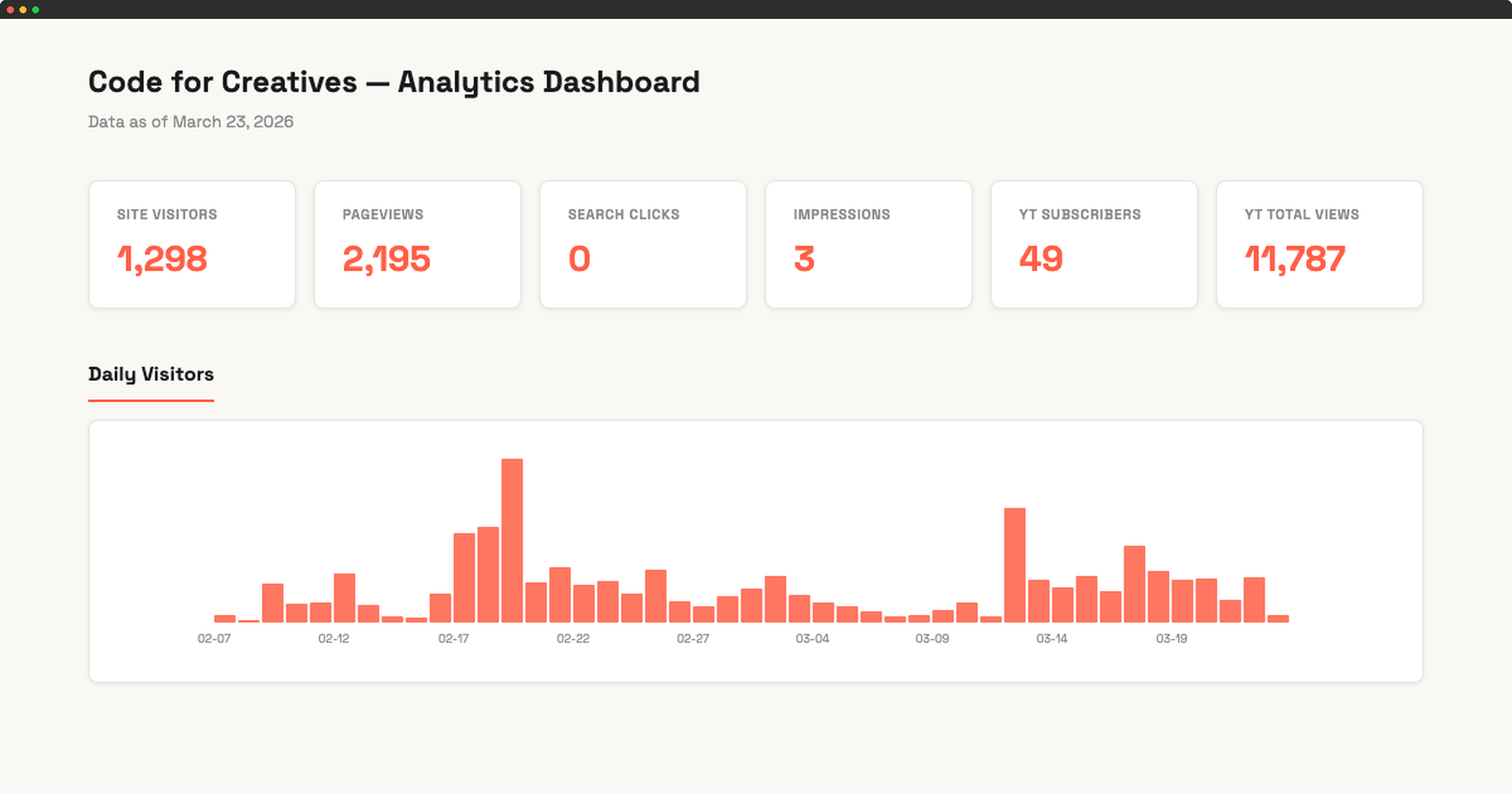
Plausible shows visitors and page views. Google Search Console shows what people searched to find the site. YouTube analytics live in YouTube. Checking all three means three tabs, three logins, and enough friction that it just doesn’t happen.
Claude Code can connect to all three and combine them into a single HTML dashboard. One command refreshes everything.
Connecting to Google Search Console
The Search Console API requires a Google Cloud project with OAuth credentials. Claude Code handles the setup: creating the project configuration, enabling the API, and running the authentication flow. The only manual step is clicking through the Google consent screen in a browser. Takes about 15 minutes.
Once connected, the script pulls 90 days of search data: which queries are bringing up the site, how many impressions and clicks each page gets, average position, device breakdown, and top countries.
Running a technical SEO audit
With access to the Search Console API and the site’s source code, Claude Code can audit technical SEO in the same session. It fetches every page and checks meta tags, canonical URLs, sitemap structure, and heading hierarchy.
On a recent audit of codeforcreatives.com, it found 6 issues:
- The www subdomain was serving duplicate content instead of redirecting
- Several pages were missing canonical tags
- The sitemap only listed one URL instead of indexing all pages
- The stuff-ive-built page had 90+ H1 tags instead of one
- Two blog posts getting search impressions had weak titles and missing meta descriptions
All six were fixed and deployed in the same session. The two posts with impressions got rewritten titles that describe what’s actually in them.
Adding YouTube and Plausible
YouTube has its own API, same OAuth pattern. Claude Code builds a second script that pulls channel stats, recent video performance, and top videos by views.
Plausible doesn’t offer API access on all plans, but it exports CSV files. Claude Code parses the export and pulls out daily visitors, top pages, and traffic sources.
A third script reads all three data sources and generates a single HTML dashboard.
What the dashboard shows
Six overview cards at the top: site visitors, pageviews, search clicks, search impressions, YouTube subscribers, and total YouTube views. Below that, a daily visitors chart, top pages and traffic sources side by side, search performance tables, and YouTube video stats.
Running it takes about 30 seconds. The data files save locally, so previous snapshots are available for comparison.
What you need
- A Google Cloud project with Search Console API and YouTube Analytics API enabled
- OAuth credentials (client secret JSON file)
- Python with
google-api-python-clientinstalled - A Plausible CSV export (if using Plausible)
- Claude Code to build and wire everything together
The whole setup, including the SEO audit and fixes, took about two hours.